What it removes
Password-based authentication fails because both sides have to know the same thing. A one-time code is better but still relayable: a proxy that sits between the user and the real site can forward it in the seconds it stays valid.
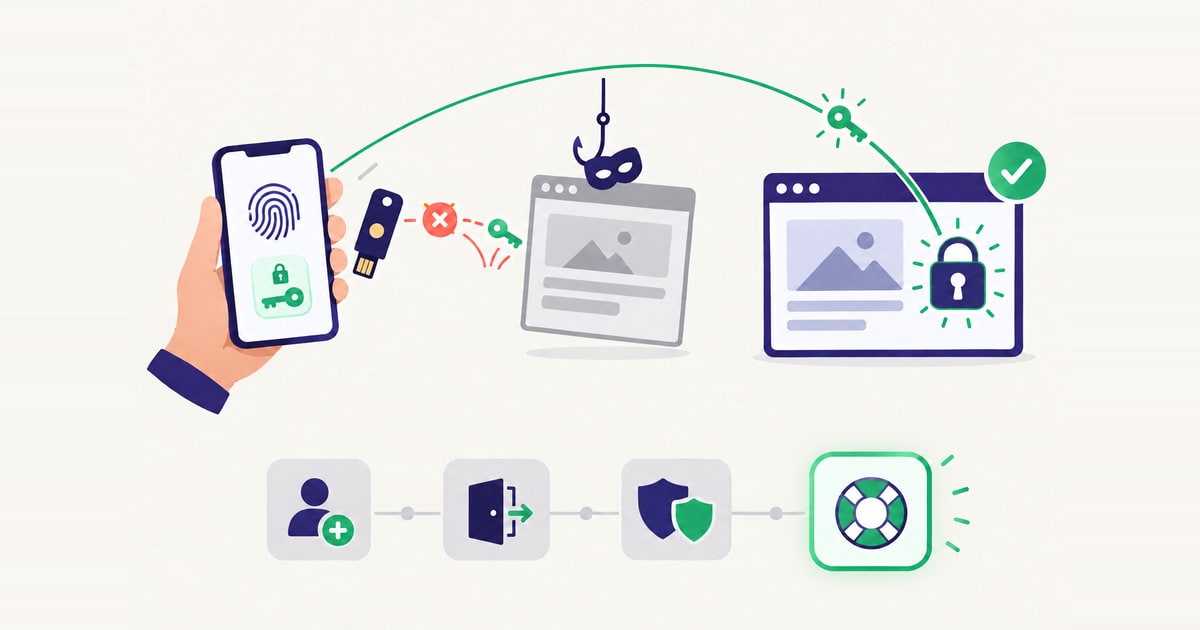
Public-key credentials remove the shared secret entirely. The private key is generated inside the authenticator and never leaves it. Each assertion is a signature over a fresh challenge that includes the origin the browser is actually on, so a credential created for one domain is worth nothing anywhere else. There is nothing for a proxy to forward.
The pieces
- WebAuthn is the browser-facing API: how a site asks for a credential to be created, and how it asks for an assertion.
- CTAP2 is how the client platform talks to the authenticator — over USB, NFC, Bluetooth Low Energy, or an internal channel.
- Passkeys are discoverable credentials, synchronised across a person’s devices. Because the authenticator can enumerate what it holds, sign-in without a username becomes possible.
FIDO2 is not a replacement for OAuth 2.0 or OpenID Connect. It strengthens the authentication step inside them, while the federation protocol keeps handling token issuance and the session.
Rolling it out
The technology is the easy part. What decides whether a programme finishes is enrolment — getting credentials onto devices for a whole population, including the people who are remote and the ones who will do it once and never again — and recovery, which is dealt with at the end of this guide because it is the part most often left there.
In Monokee: the relying party
Everything above is standard. What an implementation actually decides is the relying party configuration, and in Monokee that lives in Access Management, under FIDO2 Configurations. It is one screen, and each field on it is a policy decision rather than a technical detail:
- Hostname is the relying party identifier — the
rpId. It must match the domain the application is served from, because the browser refuses an assertion whose origin does not agree with it. This single field is what makes a stolen credential worthless elsewhere. - Authenticator type decides what people are allowed to use. Single platform restricts registration to authenticators bound to one device — Windows Hello, Touch ID, Face ID. Multiple platform allows roaming authenticators: USB and NFC security keys, and passkeys that travel between devices. Unspecified enforces no preference.
- Register with local key is the stricter version of the same question: whether a device-bound authenticator is required rather than merely allowed.
- User verification decides whether the PIN or biometric gesture is mandatory (Required), left to the authenticator (Preferred), or actively avoided (Discouraged). This is the field that determines whether one gesture counts as two factors — possession of the authenticator plus verification of the person — or only as one.
- Type of attestation decides whether you learn which authenticator model was used. None asks for nothing; Direct has the authenticator state its provenance to the relying party; Indirect anonymises it. You need Direct if the policy is to accept only certified keys, and you can do without it if any authenticator will do.
- Cryptographic algorithm lists the key types you accept, by COSE identifier:
-7is ES256,-257is RS256. Configuring more than one buys compatibility across a mixed estate. - Timeout and challenge size are the operational two: how long the person has to complete the ceremony, and how many bytes of randomness go into the challenge.
Two of these deserve to be decided by name rather than by default. Authenticator type is where a passkey programme and a security-key programme part company, and user verification is where “passwordless” either does or does not also mean multi-factor.
In Monokee: the ceremonies
The relying party defines what a credential may be. When a credential is asked for is decided elsewhere — in the Visual Identity Orchestrator, where a flow is a graph of nodes with explicit branches, and each of the four moments is a flow of its own:
- Registration, which is where enrolment policy lives: who is offered a passkey, what proof they must give before one is bound to their account, and whether a second credential is required at the same time.
- Sign-in, which asks for the assertion.
- Step-up, which asks for a second one when the action justifies it rather than at every login.
- Recovery, which is the flow that matters most and gets built last.
Because the branches are on a diagram, “engineers get security keys, everyone else gets passkeys, contractors keep codes until their devices are enrolled” is an edit to the flow rather than a release in every application. Flows are versioned, so the change is reversible and the state before it is recoverable; and a sequence you have built once — a verification step, a fallback path — can be saved as a node and reused in the next flow instead of being drawn again.
Applications that only accept passwords sit behind the access layer, where Monokee acts as identity provider or broker. The person stops seeing a password even where the system behind still expects one.
Do the recovery flow first
A lost phone on a Monday morning is a weekly event at any real size. If recovery ends in a call to a service desk that cannot verify the caller, every passkey in the estate is worth one convincing conversation — and the strength of the relying party configuration above counts for nothing.
Treat it as a journey like the others: its own verification steps, its own thresholds, its own audit trail. It is the one flow worth designing before the rollout rather than during it.
The programme view is on the Passwordless rollout page, and the wider protocol surface on Standards & protocols.